An assistant on Sigrix is a prompt that does one job when it is asked: answer a shop's customer emails, check a contract against a checklist, turn meeting notes into actions. It works with the person using it, turn by turn, and it uses a tool only when that serves the request. One that runs a whole task on its own is an agent; the difference is in AI assistant vs AI agent.
This guide is for sellers: what an assistant listing carries, the three stages of building one, what your buyer downloads, and how review reads it.
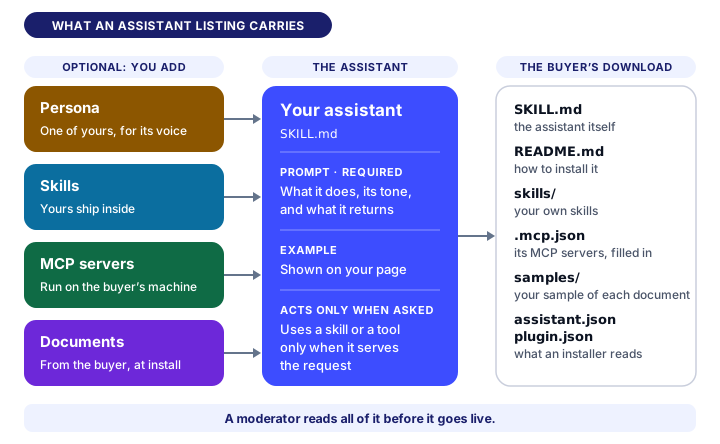
What an assistant listing carries
The prompt is the only part you must write. It is the assistant itself: what it does, its tone, what it returns, and that it waits for the buyer's input before it starts. Everything else is optional.
- One example. A message a buyer would send and what the assistant returns. Your page shows it to every visitor, so it is how a buyer sees the assistant work before paying.
- A persona. One of your own persona listings, for its voice. The persona opens the assistant's instructions, and your prompt stays the task.
- Skills. Skill listings it reaches for when a request needs one. Your own skills ship inside the download, and buying the assistant gives the buyer them too. Another seller's skill is sold separately, and your page shows its price.
- MCP servers. MCP server listings it calls for live tools and data, such as a mailbox or a calendar. They run on the buyer's machine, signed in with the buyer's own account, and Sigrix holds no connection to them.
- Documents it asks for. The files a buyer hands it at install, such as their refund policy or price list. For each one you say what to give, which file types it takes and whether the assistant needs it before it runs, and you upload a made-up sample, never a real customer's data. Your page names every document before anyone buys.
You can also give it one of your own prompt listings as its task, in place of the prompt you write, which then stays as a fallback.
Build it in three stages
Open Publish, choose Assistant, and the wizard takes you through three stages.
1. Assistant content. The listing's name, description, category and price, then the prompt and its example. Write the prompt as instructions to the model, not as a message to a person. Leave your skills and tools out of it: the download adds the lines telling the model when to use them.
2. Building blocks. Attach the skills, the MCP servers and the documents it asks for, each document with your sample. A persona or a prompt of your own goes here too, under "Reference your own listings". All of it is optional.
3. Preview & submit. Your card as shoppers see it, your page as a buyer sees it, and the download itself, so you can install your own assistant before anyone buys it. The "Before you submit" list says what is still missing.
To submit you need a name, a description of at least 200 characters, a category, the prompt, and a sample for every document it asks for. A paid assistant also needs your payouts set up, and a founding seller accepts the founding-seller agreement once, which the wizard links before you submit.
What your buyer gets
One zip, the same one you download from Preview:
| File | What it is |
|---|---|
SKILL.md | The assistant itself: your persona's voice, your prompt, and the lines naming its skills and tools |
README.md | How to install it in Claude Code, as a claude.ai Project skill, or as an API call's system message |
skills/ | Your own skills, each as its own SKILL.md |
.mcp.json and setup.sh | Its MCP servers, filled in, and the one-time setup for the buyer's own credentials |
samples/ | Your made-up sample of each document |
assistant.json and plugin.json | The manifests an installer reads, such as Bailey, our open-source assistant |
SKILL.md is an open format, so the same file also works in Cursor, VS Code and most agent tools, and the README lists them. The assistant asks before any tool that changes something, such as sending an email.
How review reads it
A moderator reads what ships, not only the listing's text: the prompt and its example, the persona, every skill, each MCP server with the command it starts on the buyer's machine, and each document with your sample. Before that:
- When you submit, the prompt, the documents' descriptions and the servers it declares are scanned for prompt injection and for pasted keys, and a hit refuses the submission.
- A sample is scanned when you upload it, and refused if it carries either.
- Each MCP server's launch line is read for commands no one can review, such as a shell handed its script inline.
While your assistant is in review the wizard is locked. Once it is live, an edit to what it ships sends it back to review, so buyers never get a version no one has read.
FAQ
What do I need to publish an assistant? A prompt that does one job, written as instructions to the model; a name, a description and a category; and, for each document it asks a buyer for, a made-up sample. A paid assistant also needs your payouts set up.
Do my skills ship with the assistant? Your own do: they are inside the download, and buying the assistant gives the buyer them too. Another seller's skill is sold separately, and your page shows its price.
What does a buyer get when they buy an assistant? One zip: the assistant as SKILL.md, a README for installing it in Claude Code, a claude.ai Project or an API call, your own skills, the setup for any MCP server, your sample of each document, and the manifests an installer reads.
Does an assistant act on its own? No. It answers when it is asked, uses a skill or a tool only when that serves the request, and asks before any tool that changes something. One that runs a task on its own is an agent.
How is an assistant reviewed? A moderator reads everything it ships: the prompt, the example, the persona, every skill and document, and each MCP server with the command it runs. Scans read the prompt, the documents and the servers when you submit, and every sample as you upload it.
Ready? Start selling on Sigrix, or open Publish and choose Assistant.
One practical essay, every other Tuesday.
Patterns, sample listings, and short essays from the Sigrix editorial team. One-click unsubscribe, no noise.
0 Comments
Join the discussion. Be kind and stay on topic.