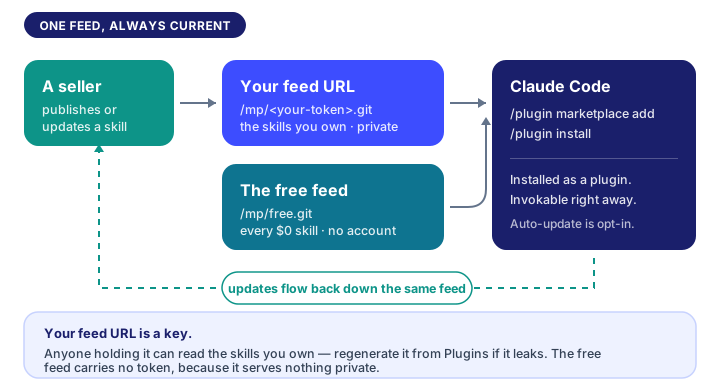
Bought a skill on Sigrix? It can install straight into Claude Code and stay updated — no re-downloading files. One command, once, and every skill you own (or later buy) shows up as an installable plugin.
§ 01 One-time setup
- Open Plugins and hit Create feed URL.
- Copy the command it shows you. It looks like this:
/plugin marketplace add https://…/mp/<your-token>.git- Paste it into Claude Code. Done — that's the whole setup.
Your feed URL is shown in full exactly once, at creation. Treat it like a private calendar link: anyone who has it can read the skills you own. If it ever leaks (shell history, a screen share), regenerate it on Plugins — the old URL stops working immediately.
§ 02 Installing a skill
Every skill page and your library show the exact install command for skills you own:
/plugin install <skill-name>@sigrixThat's it. The skill is now invokable in Claude Code.
§ 03 Getting updates
When a seller ships an update, it flows through the feed:
- Manual: run
/plugin marketplace update sigrixany time. Unchanged skills are skipped; updated ones are fetched. - Automatic: in Claude Code, run
/plugin, open Marketplaces, selectsigrix, and enable auto-update. (Auto-update is off by default for third-party marketplaces.)
New purchases appear the same way — update the marketplace and install.
§ 04 Refunds, revocation, and your feed URL
- A refunded skill drops out of your feed on the next update. Anything already installed stays in your local plugin cache — please uninstall it; your license ended with the refund.
- Regenerate (Plugins) replaces your feed URL. The old one dies on the very next request. You'll need to re-add the marketplace with the new URL.
- Revoke turns the feed off entirely until you create a new URL.
§ 05 No account? There's a free feed
Every skill priced at $0 is served from one public marketplace that needs no token and no Sigrix account:
/plugin marketplace add https://sigrix.io/mp/free.git
/plugin install <skill-name>@sigrix-free
Note the marketplace name: free skills live in sigrix-free, while the skills you have bought live in sigrix. Installing a free skill from the wrong one is the most common reason a name is "not found".
Each free skill carries a line crediting its seller and linking back to the listing — that's the trade for reaching people who have not signed up.
§ 05 Prefer plain files?
The portable SKILL.md download on every skill page is the same compiled content the feed serves. It works offline and in other tools that speak the agentskills.io format — Codex CLI, OpenCode, claude.ai projects, or the Claude API. The feed is the convenient path, not the only one.
Wrote one of your own?
The same file format you are installing here is the one Sigrix sells. If you keep a SKILL.md you rely on, it can be a listing.
Sigrix product updates, in your inbox.
One email each time a major update to Sigrix goes live, with a link to read it on the Hub. One-click unsubscribe, no noise.
0 Comments
Join the discussion. Be kind and stay on topic.